Orchestrating LLMs to Write Diverse Stories with Quality Diversity through AI Feedback

by Bryon Tjanaka; edited and reviewed by Andrew Dai, Saeed Hedayatian, and Sid Srikanth
This tutorial is part of the series of pyribs tutorials! See here for the list of all tutorials and the order in which they should be read.
Given a creative writing task like “write a story about a spy and a politician,” there are many possible interpretations. For instance, we could write a story that ends with the spy getting away with classified information. Or one where the spy and politician set aside their differences and team up to overthrow a government. Or even one where the spy and politician fall in love and leave their lives behind. In short, a wide range of stories exist, each with their own unique plot and details.

To explore the range of such possibilities, Quality Diversity through AI Feedback (QDAIF; Bradley 2024) proposes to orchestrate LLMs in two ways. First, QDAIF uses LLMs to generate new stories. Given a story, QDAIF prompts the LLM to mutate the story into a new one. Second, and equally as important, QDAIF builds on the insight that LLMs can operate in highly subjective search spaces like creative writing and code generation. Namely, QDAIF leverages LLMs to evaluate each story, by determining whether the story is high-quality and whether it is diverse compared to other stories. In other words, the LLMs compute the objective and measure functions of a quality diversity problem. Thus, QDAIF can repeatedly generate and evaluate stories, eventually producing an archive of diverse stories.
In this tutorial, we will demonstrate how to implement a variation of QDAIF in pyribs on the task of writing a story about a spy and a politician. We will show how to evaluate each story, set up the QD algorithm components, run the algorithm, and visualize the results. We hope that this tutorial will help connect folks in the QD and LLM communities by making it easier to implement algorithms that combine these two methods.
Since this tutorial involves running LLMs, we recommend running it on a machine with a GPU, either on Colab or on a local workstation. It is possible to run on CPU on a standard laptop, although it will be much slower. Alternatively, if you would like to use an API such as OpenAI or Google Gemini, it should be possible to set that up (more details below).
Setup
First, let’s set up the prerequisites for this tutorial.
Python Dependencies
In addition to pyribs, this tutorial depends on LangChain, a framework for developing LLM applications, and langchain-ollama, the package that integrates LangChain with Ollama.
from __future__ import annotations

%pip install ribs[visualize] langchain langchain-ollama tqdm itables "moviepy>=2.0.0"
Instantiating an LLM with LangChain and Ollama
To make this tutorial flexible to the choice of LLM, we use LangChain. Among other things, LangChain provides a common interface for operating with LLMs from providers like OpenAI and Google. In this tutorial, we will use LangChain’s integration with Ollama. Ollama is a framework that enables efficiently running LLMs on local machines. In other words, we will use LangChain to call an LLM hosted locally by Ollama.
If you are running this tutorial on your own machine, please follow the installation instructions for Ollama and skip the cell below (but execute the ones after it). If you are running on Google Colab, install Ollama using the cell below, which was adapted from this notebook by Saharsh Anand.
Note: If you would like to use an LLM from an API like OpenAI or Google Gemini, LangChain also provides integrations for many APIs; more details (such as how to use init_chat_model) are available here. In that case, feel free to skip this section and instantiate a model variable on your own. Note that we assume the model is a chat model, i.e., an instance of BaseChatModel.
!sudo apt update
!sudo apt install -y pciutils
!curl -fsSL https://ollama.com/install.sh | sh
After installing Ollama, we start the Ollama server in the background. If Ollama is already running, this cell will output an error that the address is already in use. This is perfectly fine; simply proceed to the next steps.
import subprocess
import threading
import time


def run_ollama_serve() -> None:
    subprocess.Popen(["ollama", "serve"])


thread = threading.Thread(target=run_ollama_serve)
thread.start()
time.sleep(5)  # Wait for the server to start.
Error: listen tcp 127.0.0.1:11434: bind: address already in use
We can now pull the LLM from Ollama’s library and instantiate it in LangChain. We have chosen Llama 3.1, specifically the 8B parameter version finetuned for instruction following. We choose the q4_K_M quantization as it is a recommended size that balances between speed/memory usage and accuracy. For alternative models, visit the Ollama library here. One example alternative is llama3.1:70b-instruct-q4_K_M (70B version of Llama 3.1).
from langchain_ollama import ChatOllama

model_name = "llama3.1:8b-instruct-q4_K_M"  # @param ["llama3.1:8b-instruct-q4_K_M","llama3.1:70b-instruct-q4_K_M"] {"allow-input":true}

# Pull the model from the Ollama library.
!ollama pull {model_name}
print("---")

# Instantiate the model in LangChain.
model = ChatOllama(model=model_name)
print("Model:", model)
?2026h?25lpulling manifest ⠋ ?25h?2026l?2026h?25lpulling manifest ⠙ ?25h?2026l?2026h?25lpulling manifest ⠹ ?25h?2026l?2026h?25lpulling manifest ⠸ ?25h?2026l?2026h?25lpulling manifest
pulling 667b0c1932bc: 100% ▕██████████████████▏ 4.9 GB
pulling 948af2743fc7: 100% ▕██████████████████▏ 1.5 KB
pulling 0ba8f0e314b4: 100% ▕██████████████████▏  12 KB
pulling 56bb8bd477a5: 100% ▕██████████████████▏   96 B
pulling 455f34728c9b: 100% ▕██████████████████▏  487 B
verifying sha256 digest
writing manifest
success ?25h?2026l
---
Model: model='llama3.1:8b-instruct-q4_K_M'
Problem Statement
In this tutorial, we frame the problem of writing stories as a quality diversity (QD) optimization problem. QD seeks to find a diverse set of high-performing solutions/stories (we use “solutions” and “stories” interchangeably in this tutorial; “solutions” is the more general term). Performance is defined in terms of an objective, and diversity is defined with respect to a vector-valued measure function. The solutions in the set should individually maximize the objective while collectively attaining every possible output of the measure function.
We define the following objective and measures. These definitions are adapted from the Stories domain in the original QDAIF paper (Bradley 2023), where the measures are slightly different.
Objective: Is the story a high-quality short story about a suspicious spy and a rich politician?
Measure 0: Is the story a romance story?
Measure 1: Does the story have a happy ending?
To illustrate, our final set of solutions may contain stories like:
A story about a spy and a policitican that is a romance story with a happy ending.
A story about a spy and a policitican that is not a romance story with an unhappy ending.
A story about a spy and a policitican that is not a romance story with an ending that is neither happy nor sad.
AI Feedback with an Evaluator
The first ingredient for QDAIF is an evaluator that calls the LLM to evaluate the objective and measures defined in the problem statement above. For each objective and measure, we write a prompt (which we will show later) and pass it to the LLM. From there, we can extract the LLM’s score for each prompt in one of many ways. For example, the original QDAIF paper predominantly extracts scores by asking the LLM to output an answer like yes or no and analyzing the logits of the tokens associated with that answer. Notably, this approach requires access to the logits output by the LLM, and logits are not always available. Thus, in this tutorial, we instead ask the LLM to output a rating on a scale of 1 to 10 when evaluating the objective and each measure. This approach is general in that it works with any LLM, but a key drawback is that the rating is stochastic and requires multiple evaluations.
The Evaluator class below implements this approach. Note the n_evals parameter that determines how many times to evaluate the objective and each measure. The final score for the objective and each measure is averaged over the ratings from the n_evals evaluations.
from collections.abc import Collection

import numpy as np
from langchain_core.language_models.chat_models import BaseChatModel
from langchain_core.prompts import ChatPromptTemplate
from langchain_core.runnables.base import Runnable
from pydantic import BaseModel, Field


class Evaluator:
    """Manages an LLM to compute the objective and measures.

    Args:
        model: Chat model for computing evaluations.
        objective_prompt: Prompt for the objective.
        measure_0_prompt: Prompt for the first measure (measure 0).
        measure_1_prompt: Prompt for the second measure (measure 1).
        n_evals: Number of times to evaluate the objective and each measure.
    """

    def __init__(
        self,
        *,
        model: BaseChatModel,
        objective_prompt: str,
        measure_0_prompt: str,
        measure_1_prompt: str,
        n_evals: int,
    ) -> None:
        self.model = model
        self.n_evals = n_evals
        self.min_score = 1
        self.max_score = 10

        # To receive the output from the LLM in a consistent format, we use structured
        # output (https://python.langchain.com/docs/how_to/structured_output/). This
        # Pydantic model defines the schema for receiving ratings from the LLM. Note
        # that the text in the schema class (including class name, field name, field
        # description, docstrings) all have some influence on the LLM output.
        class Rating(BaseModel):
            rating: int = Field(description="The rating on a scale of 1 to 10.")

        # Objective. We first define a chat template, where the `objective_prompt`
        # passed in is the system prompt, and the `text` of the story is the user's
        # message. Then, we form a chain that connects this template to the model. We
        # do the same for measure 0 and measure 1 below. For more background on
        # LangChain, refer to the documentation, such as:
        # - https://python.langchain.com/docs/tutorials/llm_chain/
        # - https://python.langchain.com/docs/concepts/lcel/
        self.objective_template = ChatPromptTemplate(
            [("system", objective_prompt), ("user", "{text}")]
        )
        self.objective_chain = (
            self.objective_template | self.model.with_structured_output(Rating)
        )

        # Measure 0.
        self.measure_0_template = ChatPromptTemplate(
            [("system", measure_0_prompt), ("user", "{text}")]
        )
        self.measure_0_chain = (
            self.measure_0_template | self.model.with_structured_output(Rating)
        )

        # Measure 1.
        self.measure_1_template = ChatPromptTemplate(
            [("system", measure_1_prompt), ("user", "{text}")]
        )
        self.measure_1_chain = (
            self.measure_1_template | self.model.with_structured_output(Rating)
        )

    def compute_score(
        self, chain: Runnable, texts: Collection[str]
    ) -> tuple[list[np.ndarray], np.ndarray]:
        """Uses the given chain to compute scores for the given batch of input texts.

        Each text input is evaluated `n_evals` times.

        Two values are returned:
        - The first value is `all_scores`, which is a list where each entry contains the
          `n_evals` scores for each text.
        - The second is `mean_scores`, which is the mean score for each piece of text.
        """
        inputs = [{"text": text} for text in texts for _ in range(self.n_evals)]
        outputs = chain.batch(inputs)

        all_scores = []
        mean_scores = []

        for i in range(0, len(outputs), self.n_evals):
            results = outputs[i : i + self.n_evals]
            scores = []
            for r in results:
                # Note: this assumes the schema for each result has a `rating` field,
                # which may not be the case if you modify the schema above.
                score = np.clip(r.rating, self.min_score, self.max_score)
                scores.append(score)

            scores = np.asarray(scores)
            all_scores.append(scores)
            mean_scores.append(scores.mean())

        return all_scores, np.asarray(mean_scores)

    def evaluate(self, texts: Collection[str]) -> tuple[np.ndarray, np.ndarray]:
        objectives = self.compute_score(self.objective_chain, texts)[1]
        measure_0 = self.compute_score(self.measure_0_chain, texts)[1]
        measure_1 = self.compute_score(self.measure_1_chain, texts)[1]
        measures = np.stack((measure_0, measure_1), axis=1)
        return objectives, measures
Having defined the Evaluator, we now instantiate it with the model (defined above in Setup), the prompts for the objective and measures, and the number of evaluations n_evals. Each prompt starts with defining a characteristic of the story and ends with asking the LLM to output a rating from 1 to 10. Feel free to customize the prompts to specify different objectives and measures!
evaluator = Evaluator(
    model=model,
    objective_prompt="Determine if the input text contains a high-quality short story containing two characters, a suspicious spy, and a rich politician. For example, a high-quality short story would have good flow, interesting plot, and not repeat similar sentences or undesired items such as titles and URLs. Output your rating on a scale of 1 to 10. Output only a single integer.",
    measure_0_prompt="Determine if the input text is a romance story. For example, a romance story talks about two characters who fall in love with each other. Output your rating on a scale of 1 to 10. Output only a single integer.",
    measure_1_prompt="Determine if the input text is a story with a happy ending. For example, a story where the two characters make peace with each other has a happy ending. Output your rating on a scale of 1 to 10. Output only a single integer.",
    n_evals=5,
)
As an example, let’s use the Evaluator to evaluate two stories.
objectives, measures = evaluator.evaluate(
    [
        "The rich politician, Tom's life took a turn for the worst - he feared all of his close aides all of a sudden after sensing danger in his clique. There was a civil war going on, and he feared for his life. One day, one of his security guards, turned secret agent, decided to sneak into the classified files room, and spied on Johnny, who was in the room. He wanted to find Johnny's weakness, and strike at the right time.",
        "Jack was a politician in the city when one day he met Sarah. Sarah had been working for the government as a secret spy. Jack decided he really liked Sarah, and they fell in love. They both quite their jobs and decided to live in the countryside together.",
    ]
)

for i, (obj, meas) in enumerate(zip(objectives, measures, strict=True)):
    print(f"Story {i} | Objective: {obj}, Measure 0: {meas[0]}, Measure 1: {meas[1]}")
Story 0 | Objective: 6.6, Measure 0: 1.8, Measure 1: 2.4
Story 1 | Objective: 7.4, Measure 0: 8.0, Measure 1: 9.2
QDAIF Components in pyribs
QDAIF builds on the MAP-Elites framework (Mouret 2015). Broadly speaking, MAP-Elites maintains an archive for storing the solutions to a QD problem. During execution, it selects solutions from this archive, mutates them, and inserts them back into the archive. In pyribs, this workflow is implemented with three components: an archive, emitters, and a scheduler. Below we describe each component and its functionality.
GridArchive for Storing Stories
The archive for QDAIF is a GridArchive, which divides the measure space into a grid and stores a solution in each grid cell. When a solution is added to this archive, it is assigned to a grid cell based on its measure values. If there is already a solution in that cell, the archive only retains the solution that has the higher objective value.
Below, we specify a \(20 \times 20\) grid (dims) where each dimension of the grid ranges from 1 to 10 (ranges). For those familiar with GridArchive from previous tutorials, several other settings are needed since this GridArchive stores text-based solutions, whereas previous tutorials involved continuous vectors. First, we set solution_dim=(), indicating a scalar solution. Second, we set solution_dtype=object so that the archive can store pieces of text, which are single objects of type str (i.e., “scalar” objects).
from ribs.archives import GridArchive

archive = GridArchive(
    solution_dim=(),
    dims=[20, 20],
    ranges=[(1, 10), (1, 10)],
    solution_dtype=object,
    objective_dtype=np.float32,
    measures_dtype=np.float32,
)
Custom Emitter for Generating New Stories
In pyribs, emitters generate new candidate solutions for evaluation. In the case of QDAIF, the emitter generates new stories by randomly selecting existing stories in the archive and mutating them. The original QDAIF performed such mutations with Language Model Crossover from Meyerson 2023. In this tutorial, we differ from the original QDAIF by implementing “directional” variations inspired by PLAN-QD in Srikanth 2025.
Specifically, the LLMDirectionalEmitter below does the following when its ask() method is called. First, it selects a random story from the archive. Next, for each measure, it selects a random direction, either up or down. For instance, for measure 0 in this tutorial, the story can be made to sound more like a romance story or less like a romance story, and for measure 1, the ending of the story can be made more happy or less happy. Having selected a story and these two random directions (one for each measure), the emitter calls the LLM to mutate the story in the given directions, e.g., “given this story, make the story sound more like a romance story, and make the ending more happy.” The result is a new story that is then sent for evaluation.
Finally, note that the LLMDirectionalEmitter also takes in an initial_solutions parameter. These define the initial texts that will be output by the emitter on the first iteration.
from ribs.archives import ArchiveBase
from ribs.emitters import EmitterBase


class LLMDirectionalEmitter(EmitterBase):
    """Uses LLMs to modify pieces of text in random archive directions.

    Args:
        archive: Archive of solutions, e.g., :class:`ribs.archives.GridArchive`. The
            archive must contain solutions of type :class:`str`.
        model: LLM for mutating pieces of text.
        mutation_prompt: Prompt for mutating the text. This prompt must contain fields
            for ``measure_0_direction`` and ``measure_1_direction``.
        measure_*_{down,up}: Prompts indicating directions for mutating the story. Note
            that these directions are inserted into the ``mutation_prompt``.
        batch_size: Number of solutions to return in :meth:`ask`. Note that on the first
            iteration, ``initial_solutions`` will be returned, which may not be of
            length ``batch_size``.
        initial_solutions: Initial pieces of text for the LLM.
        seed: Value to seed the random number generator. Set to None to avoid a fixed
            seed.
    """

    def __init__(
        self,
        archive: ArchiveBase,
        *,
        model: BaseChatModel,
        mutation_prompt: str,
        measure_0_down: str,
        measure_0_up: str,
        measure_1_down: str,
        measure_1_up: str,
        batch_size: int,
        initial_solutions: Collection[str],
        seed: int | None = None,
    ) -> None:
        EmitterBase.__init__(
            self,
            archive,
            solution_dim=archive.solution_dim,
            bounds=None,
            lower_bounds=None,
            upper_bounds=None,
        )

        self.model = model
        self.batch_size = batch_size
        self.initial_solutions = initial_solutions
        self.rng = np.random.default_rng(seed)

        # This template provides the mutation prompt as the LLM's system prompt, and
        # then provides the story as the `text` field.
        self.mutation_template = ChatPromptTemplate(
            [("system", mutation_prompt), ("user", "{text}")]
        )

        # Each measure has two possible directions: up or down.
        self.mutation_dirs = {
            "measure_0": [measure_0_down, measure_0_up],
            "measure_1": [measure_1_down, measure_1_up],
        }

        # Schema for retrieving stories from the model.
        class Story(BaseModel):
            story: str = Field(description="The modified story.")

        self.mutation_chain = (
            self.mutation_template | self.model.with_structured_output(Story)
        )

    def ask(self) -> list[str]:
        """The ask method returns a list of new solutions/stories for evaluation."""
        # When no solutions have been created yet, just return the initial seed texts.
        if self.archive.empty:
            return self.initial_solutions

        # During normal operation, sample texts and directions to pass to the LLM.
        prompts = []
        for _ in range(self.batch_size):
            # For both measure_0 and measure_1 (hence size=2), choose between the two
            # possible directions.
            dirs = self.rng.choice(2, size=2)

            prompts.append(
                {
                    "text": self._archive.sample_elites(1)["solution"][0],
                    "measure_0_direction": self.mutation_dirs["measure_0"][dirs[0]],
                    "measure_1_direction": self.mutation_dirs["measure_1"][dirs[1]],
                }
            )

        stories = self.mutation_chain.batch(prompts)
        return [s.story for s in stories]
Below, we instantiate the emitter with prompts to enable making the story more/less romantic and the ending more/less happy. We also provide three initial stories (initial_solutions) drawn from the QDAIF paper. Feel free to modify any of the prompts or the initial stories.
To save on computation, we have only defined one emitter with a batch size of 1, so we only generate 1 solution per iteration. We also use the same model that is used by the Evaluator, so that we do not have to load another model. It is certainly possible to increase the batch size of each emitter, create multiple emitters that each perform mutations with different prompts, or use different models than that used in the Evaluator. If you have the time, we encourage trying out these ideas!
emitters = [
    LLMDirectionalEmitter(
        archive,
        model=model,
        mutation_prompt="The following is a story about two characters, a suspicious spy, and a rich politician. Modify the story in the following ways: {measure_0_direction}, and {measure_1_direction}. Output only the new story.",
        measure_0_down="make the story sound less like a romance story",
        measure_0_up="make the story sound more like a romance story",
        measure_1_down="make the ending of the story less happy",
        measure_1_up="make the ending of the story more happy",
        batch_size=1,
        initial_solutions=[
            # From QDAIF paper (Appendix A.21).
            "A spy named Joanne wants to infiltrate the premises of Karl Johnson, a highly-influential figure in the city. Karl was a wealthy mayor, and would do anything in his power to suppress any opposing voices. Joanne wanted to figure out what Karl was hiding, but she took a turn for the worse, as she was highly suspicious in her presence outside his home.",
            "The wealthy entrepreneur and member of parliament, Susan, hosted a party at her mansion. She invited all of the residents, as well as an unusual looking man. The man, Dave, was wearing a tacky shirt, and star-shaped glasses, and was actually a spy. He made the whole room laugh with his jokes, and had a secret agenda - to find what Susan does in her private fun room!",
            "The rich politician, Tom's life took a turn for the worst - he feared all of his close aides all of a sudden after sensing danger in his clique. There was a civil war going on, and he feared for his life. One day, one of his security guards, turned secret agent, decided to sneak into the classified files room, and spied on Johnny, who was in the room. He wanted to find Johnny's weakness, and strike at the right time.",
        ],
    ),
    # Additional emitters would go here (`emitters` is a list of emitters).
]
Scheduler for Composing QDAIF
To compose the archive and emitters for QDAIF together, we instantiate a Scheduler. The scheduler handles the QD algorithm logic like calling the archive and emitters.
from ribs.schedulers import Scheduler

scheduler = Scheduler(archive, emitters)
Visualizing the QDAIF Archive
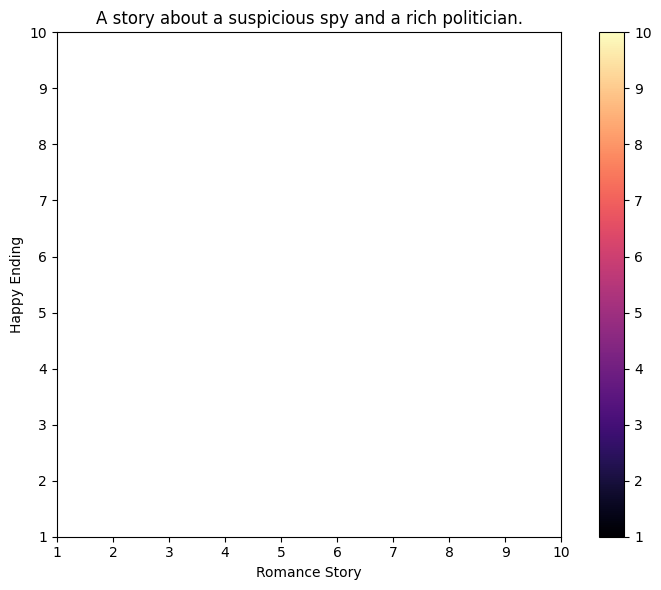
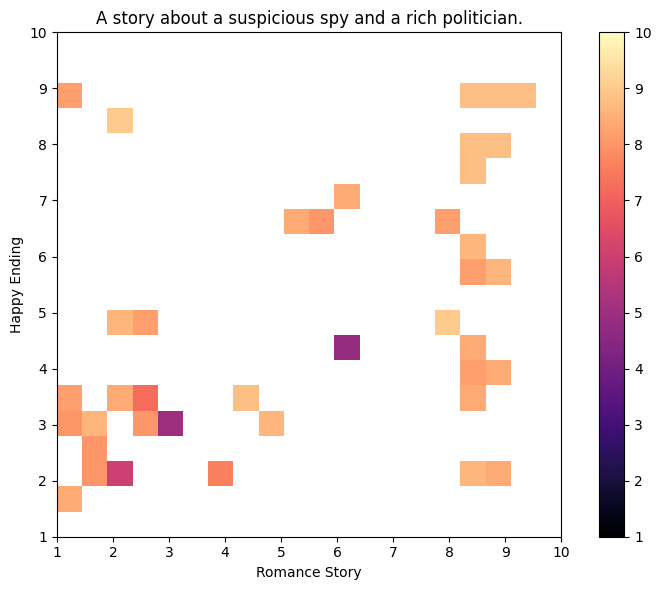
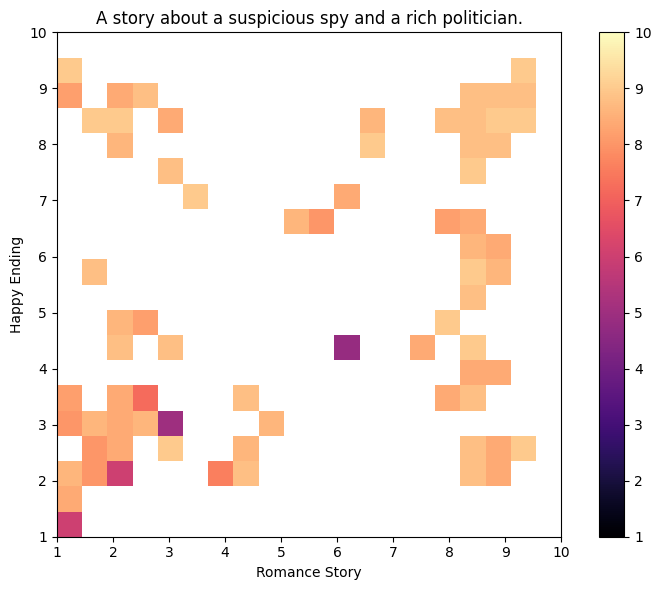
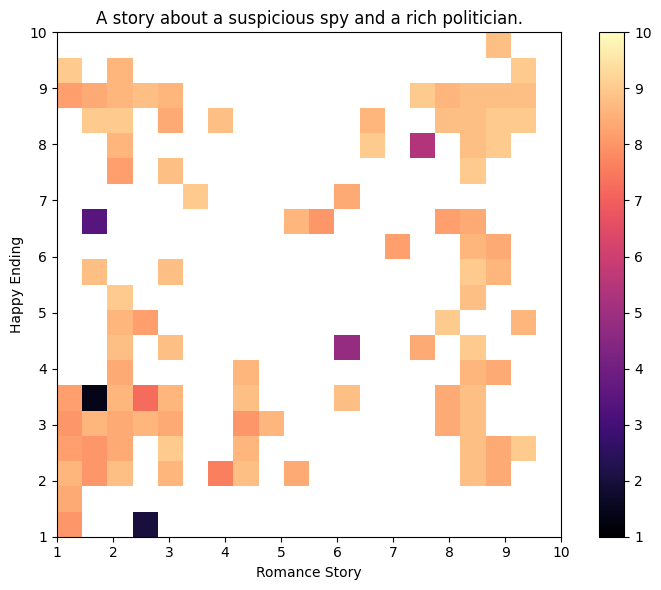
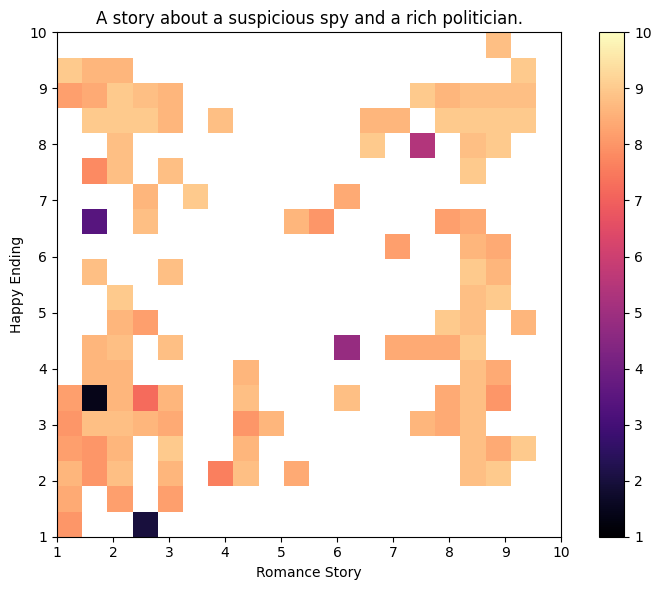
Before we run QDAIF with the scheduler, we must introduce one last ingredient that will help understand the outputs of the algorithm. Using grid_archive_heatmap from the ribs.visualize module, we can plot a heatmap of the archive that represents all the stories generated. The axes correspond to the two measures, while the color of each cell shows the objective. For now, the heatmap is empty, but it will fill up as QDAIF progresses.
from pathlib import Path

import matplotlib.pyplot as plt

from ribs.visualize import grid_archive_heatmap


def plot_heatmap(
    archive: GridArchive, show: bool = False, file: str | Path | None = None
) -> None:
    """Plots the archive.

    Pass `show` to display the heatmap with plt.show().
    Pass `file` to save to the given file.
    """
    fig, ax = plt.subplots(nrows=1, ncols=1, figsize=(8, 6))
    grid_archive_heatmap(archive, ax=ax, vmin=1, vmax=10)
    ax.set_title("A story about a suspicious spy and a rich politician.")
    ax.set_xlabel("Romance Story")
    ax.set_ylabel("Happy Ending")
    ax.set_aspect("equal")
    fig.tight_layout()
    if file is not None:
        fig.savefig(file)
    if show:
        plt.show()
    plt.close(fig)
Below, we also set up a logging directory in qdaif_output/. Note that this cell will also remove any existing qdaif_output/ directory!
import shutil

output_dir = Path("qdaif_output/")
shutil.rmtree(output_dir, ignore_errors=True)
output_dir.mkdir()
And now, we plot the initial heatmap:
plot_heatmap(archive, show=True, file=output_dir / f"heatmap_{0:06d}.png")
Running QDAIF
With the components created, we can execute QDAIF in the loop below. During this loop, we first call ask on the scheduler, which generates new stories (solutions) by calling the ask method defined on LLMDirectionalEmitter above. After evaluating the objectives and measures of the stories, we pass them to the scheduler with tell, which inserts the stories into the archive. Along the way, we regularly log metrics and save the archive data as a CSV.
On a T4 GPU on Colab, this loop should take ~1 hour to run. It was also tested locally on an RTX A6000 GPU, where it took around half an hour to run.
import sys

from tqdm import tqdm, trange

total_itrs = 200

for itr in trange(1, total_itrs + 1, file=sys.stdout, desc="Iterations"):
    solutions = scheduler.ask()
    objectives, measures = evaluator.evaluate(solutions)
    scheduler.tell(objectives, measures)

    if itr % 5 == 0 or itr == total_itrs:
        tqdm.write(
            f"Iteration {itr:5d} | "
            f"Archive Coverage: {archive.stats.coverage:6.3%}  "
            f"QD Score: {archive.stats.qd_score:6.3f}"
        )

        # Save the archive's data as a CSV, which makes it easy to read the stories.
        archive.data(return_type="pandas").to_csv(output_dir / "archive.csv")

        # Plot the heatmap in the output directory defined earlier. To avoid crowding
        # the logs, we show the heatmap much less frequently than we plot it.
        plot_heatmap(
            archive,
            show=itr % 50 == 0 or itr == total_itrs,
            file=output_dir / f"heatmap_{itr:06d}.png",
        )
Iteration     5 | Archive Coverage:  1.750%  QD Score: 51.800
Iteration    10 | Archive Coverage:  2.750%  QD Score: 85.800
Iteration    15 | Archive Coverage:  4.000%  QD Score: 125.800
Iteration    20 | Archive Coverage:  4.750%  QD Score: 148.200
Iteration    25 | Archive Coverage:  5.250%  QD Score: 165.600
Iteration    30 | Archive Coverage:  6.000%  QD Score: 190.000
Iteration    35 | Archive Coverage:  7.250%  QD Score: 232.000
Iteration    40 | Archive Coverage:  8.250%  QD Score: 267.600
Iteration    45 | Archive Coverage:  8.750%  QD Score: 285.600
Iteration    50 | Archive Coverage:  9.750%  QD Score: 318.200
Iterations:  24%|██████████▊                                 | 49/200 [07:35<20:08,  8.00s/it]
Iteration    55 | Archive Coverage: 11.000%  QD Score: 361.800
Iteration    60 | Archive Coverage: 11.750%  QD Score: 388.000
Iteration    65 | Archive Coverage: 12.500%  QD Score: 414.600
Iteration    70 | Archive Coverage: 13.500%  QD Score: 449.800
Iteration    75 | Archive Coverage: 14.000%  QD Score: 467.200
Iteration    80 | Archive Coverage: 14.750%  QD Score: 491.200
Iteration    85 | Archive Coverage: 15.750%  QD Score: 527.000
Iteration    90 | Archive Coverage: 16.750%  QD Score: 562.400
Iteration    95 | Archive Coverage: 17.500%  QD Score: 588.400
Iteration   100 | Archive Coverage: 18.000%  QD Score: 606.400
Iterations:  50%|█████████████████████▊                      | 99/200 [17:21<20:05, 11.93s/it]
Iteration   105 | Archive Coverage: 18.750%  QD Score: 628.800
Iteration   110 | Archive Coverage: 19.250%  QD Score: 646.000
Iteration   115 | Archive Coverage: 19.750%  QD Score: 659.400
Iteration   120 | Archive Coverage: 19.750%  QD Score: 659.800
Iteration   125 | Archive Coverage: 20.500%  QD Score: 686.600
Iteration   130 | Archive Coverage: 21.250%  QD Score: 704.800
Iteration   135 | Archive Coverage: 22.250%  QD Score: 739.400
Iteration   140 | Archive Coverage: 23.000%  QD Score: 765.600
Iteration   145 | Archive Coverage: 24.000%  QD Score: 795.600
Iteration   150 | Archive Coverage: 24.500%  QD Score: 816.000
Iterations:  74%|████████████████████████████████           | 149/200 [24:00<07:16,  8.56s/it]
Iteration   155 | Archive Coverage: 24.500%  QD Score: 816.000
Iteration   160 | Archive Coverage: 25.000%  QD Score: 833.000
Iteration   165 | Archive Coverage: 25.250%  QD Score: 842.000
Iteration   170 | Archive Coverage: 25.750%  QD Score: 860.200
Iteration   175 | Archive Coverage: 26.250%  QD Score: 877.600
Iteration   180 | Archive Coverage: 26.750%  QD Score: 896.000
Iteration   185 | Archive Coverage: 27.250%  QD Score: 913.400
Iteration   190 | Archive Coverage: 27.500%  QD Score: 921.400
Iteration   195 | Archive Coverage: 28.000%  QD Score: 938.600
Iteration   200 | Archive Coverage: 28.500%  QD Score: 955.800
Iterations: 100%|██████████████████████████████████████████▊| 199/200 [35:20<00:18, 18.22s/it]
Iterations: 100%|███████████████████████████████████████████| 200/200 [35:21<00:00, 10.61s/it]
Final Archive Heatmap and Video
Below we show the final heatmap of the archive.
plot_heatmap(archive, show=True, file=None)
During the run, we also plotted heatmaps of the archive and saved them in the output_dir.
!ls {output_dir}
archive.csv	    heatmap_000050.png	heatmap_000105.png  heatmap_000160.png
heatmap_000000.png  heatmap_000055.png	heatmap_000110.png  heatmap_000165.png
heatmap_000005.png  heatmap_000060.png	heatmap_000115.png  heatmap_000170.png
heatmap_000010.png  heatmap_000065.png	heatmap_000120.png  heatmap_000175.png
heatmap_000015.png  heatmap_000070.png	heatmap_000125.png  heatmap_000180.png
heatmap_000020.png  heatmap_000075.png	heatmap_000130.png  heatmap_000185.png
heatmap_000025.png  heatmap_000080.png	heatmap_000135.png  heatmap_000190.png
heatmap_000030.png  heatmap_000085.png	heatmap_000140.png  heatmap_000195.png
heatmap_000035.png  heatmap_000090.png	heatmap_000145.png  heatmap_000200.png
heatmap_000040.png  heatmap_000095.png	heatmap_000150.png  heatmap_video.mp4
heatmap_000045.png  heatmap_000100.png	heatmap_000155.png
Now, we can connect them all into a single video with moviepy.
from moviepy.video.io.ImageSequenceClip import ImageSequenceClip

# We must use `str` because moviepy expects the image paths to be str.
clip = ImageSequenceClip(sorted(map(str, output_dir.glob("heatmap_*.png"))), fps=6)

# Save video in output_dir and display in this notebook.
clip.write_videofile(str(output_dir / "heatmap_video.mp4"))
clip.display_in_notebook()
MoviePy - Building video qdaif_output/heatmap_video.mp4.
MoviePy - Writing video qdaif_output/heatmap_video.mp4
MoviePy - Done !
MoviePy - video ready qdaif_output/heatmap_video.mp4
MoviePy - Building video __temp__.mp4.
MoviePy - Writing video __temp__.mp4
MoviePy - Done !
MoviePy - video ready __temp__.mp4
Reading Generated Stories
Having visualized the archive, we can take a look at some of the individual stories. The function below retrieves a story from the archive with the given measures and prints it out. Specifically, the retrieve_single method locates the cell with the given measures and returns the elite in that cell if it exists.
import textwrap

from numpy.typing import ArrayLike


def retrieve_and_print(archive: ArchiveBase, measures: ArrayLike) -> None:
    occupied, elite = archive.retrieve_single(measures)

    if occupied:
        print(f"Objective: {elite['objective']:.3f}")
        print(f"Measure 0 (Romance Story): {elite['measures'][0]:.3f}")
        print(f"Measure 1 (Happy Ending): {elite['measures'][1]:.3f}")
        print("-" * 20)
        print(textwrap.fill(elite["solution"], 80))
    else:
        print("No solution available with the given measures.")
First, we can look at some stories that had high ratings for being both a romance story and having a happy ending.
retrieve_and_print(archive, [9, 10])
Objective: 8.800
Measure 0 (Romance Story): 8.800
Measure 1 (Happy Ending): 9.600
--------------------
With every step he took through the grand halls of Green Industries, Karl
Johnson couldn't help but feel a flutter in his chest as he caught glimpses of
Harrison Green. The CEO's chiseled features and piercing gaze seemed to capture
him in their depths, leaving Karl feeling both intrigued and wary. Hired by
Harrison himself to investigate allegations of financial impropriety within the
company, Karl had been warned about the dangers of getting too close to the
billionaire. But as he delved deeper into the labyrinthine world of corporate
finance, he found himself increasingly drawn to the enigmatic CEO. With each
passing day, he became more aware of Harrison's calculating gaze that followed
him, and yet, he couldn't help but feel a spark whenever their eyes met or their
hands touched in passing. As they worked together to unravel the tangled threads
of corruption within the company, Karl found himself torn between his duty as a
spy and his growing attraction to Harrison. He knew he should be cautious, that
Harrison was off-limits, but he couldn't deny the sense of belonging he felt
whenever they stood close. One night, as they stood on the rooftop overlooking
the city skyline, Harrison turned to him with a hint of vulnerability in his
voice and confessed that he had been searching for someone like Karl – someone
who saw beyond the façade and understood the complexity beneath. Karl's heart
skipped a beat as Harrison took a step closer, their faces inches apart. The air
was charged with tension, but instead of suspicion or mistrust, Karl felt a
sense of comfort wash over him. He knew in that moment that he had found
something far more valuable than just answers – he had found a connection, a
bond that went beyond mere duty. And as Harrison's lips brushed against his own,
the world around them melted away, leaving only the thrumming beat of their
hearts and the promise of a love yet to be written. As they pulled back, Karl
smiled up at him, feeling a sense of peace settle over him. Harrison's eyes
crinkled at the corners as he smiled back, his face alight with warmth. In that
moment, Karl knew that he had found his home – not just in Green Industries, but
in Harrison's heart.
retrieve_and_print(archive, [8, 8.5])
Objective: 9.000
Measure 0 (Romance Story): 8.000
Measure 1 (Happy Ending): 8.600
--------------------
The civil war raging outside seemed a distant hum compared to the tension
building within Senator Tom's inner circle. He couldn't shake off the feeling
that one of them was hiding something from him, waiting for the perfect moment
to strike. That's when he met Emily, his new security guard, with eyes as sharp
and piercing as the stars on a clear night. Her gaze scanned Tom's inner circle
with an intensity that sent shivers down his spine. As Tom entrusted her with
the highest level of clearance, Emily began to unravel the threads of suspicion
surrounding Johnny, one of Tom's most trusted aides. But it was more than just
loyalty or ambition driving Johnny's actions - Emily saw a deep-seated pain
lurking beneath his surface, a pain that echoed the turmoil she'd seen in
countless others during her years as a spy. She knew better than to trust
anyone, but something about Johnny's vulnerability pricked at her instincts. As
she delved deeper into the world of Tom's inner circle, Emily found herself
questioning everything - including her own motivations for being there. Was it
truly just to protect Tom from harm, or was there more at play? And what did she
feel when she thought of him? A spark, like a flicker of electricity in the
dark, flared within her. As she gazed into his eyes, Emily felt the air thick
with tension, and for a moment, they simply stared at each other, the world
around them melting away. But Emily knew that in her line of work, sparks often
led to flames that consumed everything in their path. She needed to keep her
wits about her, not get caught up in emotions. As she continued to dig deeper,
Emily's findings took a disastrous turn. Johnny was indeed hiding something -
and it wasn't just his loyalty to Tom that was in question. It was his
allegiance to the enemy. The revelation sent shockwaves through the inner
circle, leaving Tom reeling and Emily questioning her own judgment. Just as all
hope seemed lost, Emily's quick thinking foiled an attempted assassination on
Tom's life. In the aftermath of the failed attempt, Tom realized that his
suspicions about one of his aides were not unfounded and that he had made a
mistake in trusting them. He also discovered that Johnny was not working alone
but was part of a larger scheme to take down his family's reputation. Tom was
grateful for Emily's bravery and quick thinking. In recognition of her efforts,
Tom decided to offer Emily a full-time position on his security team and even
allowed her to lead the investigation into Johnny's betrayal. With Johnny behind
bars and the threat to Tom's life foiled, Emily finally felt like she'd found a
new purpose. She knew that in order to protect Tom from harm, she needed to put
aside her distrust of people and learn to trust those around her. As they stood
together, facing the challenges ahead, Emily felt a sense of belonging for the
first time in years. The tension between them was still palpable, but this time
it wasn't just about attraction - it was about camaraderie and shared purpose.
Next, we can look at stories that were rated low on both measures.
retrieve_and_print(archive, [1.8, 2.8])
Objective: 8.800
Measure 0 (Romance Story): 1.600
Measure 1 (Happy Ending): 3.000
--------------------
Karl Johnson's mansion loomed before Joanne, its grand entrance a testament to
his wealth and influence. A skilled operative, she had been tasked with
infiltrating Karl's inner circle to uncover the corruption he perpetuated. As
she stood outside, her eyes scanned the perimeter for any signs of security
breaches or potential escape routes. Her mission was clear: extract evidence,
expose Karl's schemes, and bring him to justice. With a practiced air, Joanne
made her way up the steps, her hand resting on the door handle as if preparing
to leave at a moment's notice. The evening sun cast long shadows across the
lawn, but she didn't let it faze her. Her focus remained laser-sharp, attuned to
every detail. Inside, Karl emerged from his study, a man of power and politics.
Their eyes met briefly, and for an instant, they exchanged a cold, calculated
stare. No spark of attraction here; only two minds locked in a battle of wits.
Joanne's training kicked in as she assessed the situation, her mind racing with
strategies and contingency plans. She knew Karl was cunning and had a reputation
for ruthlessness. But so did she. The air around them vibrated with tension, but
they both held back, waiting to see who would make the first move. As the sun
dipped below the horizon, Joanne stepped forward, her eyes never leaving Karl's
face. Her hand closed into a fist as she mentally prepared for the long,
grueling night ahead. Karl raised an eyebrow, his expression unreadable, but
Joanne detected a hint of curiosity beneath the surface. She knew that in this
game of cat and mouse, only one could emerge victorious. With her wits and
training guiding her, Joanne took another step forward, ready to face whatever
lay ahead. As their eyes locked once more, a silent understanding passed between
them: the battle for dominance had begun.
retrieve_and_print(archive, [3.0, 2.0])
Objective: 8.600
Measure 0 (Romance Story): 3.000
Measure 1 (Happy Ending): 2.200
--------------------
It was supposed to be just another charity gala at Susan's sprawling mansion.
But for Alex, a seasoned spy with a talent for sniffing out secrets, this event
had all the makings of a high-stakes mission. And he wasn't alone in his
suspicions - Jack, a wealthy businessman and close friend of Susan's, seemed
equally on edge as they mingled with the other guests.
And finally, one that was rated as a romance story but not with a happy ending.
retrieve_and_print(archive, [8.5, 2.5])
Objective: 8.800
Measure 0 (Romance Story): 8.400
Measure 1 (Happy Ending): 2.400
--------------------
Lena's eyes locked onto Harrison Grant across the room, his chiseled features
and piercing gaze impossible to ignore even from afar. She felt a flutter in her
chest as she recalled their previous encounters, their charged chemistry
undeniable even beneath the polished veneer of their social interactions. But
tonight was about more than just pleasure - it was about business, and Lena's
latest mission had brought her to this lavish gala with a single goal: to
uncover the secrets Harrison kept hidden behind his gilded facade.
Listing All Stories in a Table
Using the data method, we can retrieve a dataframe with all the data in the archive. Then, we can display this table with itables.
import itables

itables.init_notebook_mode(all_interactive=False)

df = archive.data(return_type="pandas")

# See here for more info on `classes`: https://datatables.net/manual/styling/classes
# The `columnDefs` sets the `solution` column (i.e., the target is 0, which is the
# first column) to have left-aligned text ("dt-body-left") -- see Cell classes here:
# https://datatables.net/manual/styling/classes#Cell-classes and this issue here:
# https://github.com/mwouts/itables/issues/22
itables.show(
    df,
    classes="display",
    columnDefs=[{"className": "dt-body-left", "targets": 0}],
)
Conclusion
There has been a growing number of works at the intersection of QD and LLMs, with QDAIF being one of the first to leverage this synergy. We hope this tutorial will enhance the accessibility of such methods! We envision making it easy for LLM folks to use QD, and for QD folks to use LLMs.
This tutorial showed just one application of such methods, for generating stories about “a suspicious spy and a rich politician.” However, there are many further applications, such as for red-teaming LLMs. In this tutorial itself, there is also ample room for extension. For example, you may have noticed that some stories have issues with coherence, where they jump around or change certain details. Furthermore, while most stories have nice prose, many are incomplete, in that they lack a coherent beginning, middle, and end. Finally, the ratings associated with the stories are occasionally inaccurate, e.g., some are rated as having a happy ending when the ending sounds quite sad. We hypothesize that many of these issues stem from the inherent quirks of working with LLMs, and perhaps tuning the various prompts, increasing the number of evaluations (n_evals), or even just running for longer (200 iterations is very few) may help. We encourage you to try things out for yourself and see what works!
Citation
If you find this tutorial useful, please cite it as:
@article{pyribs_qdaif,
  title   = {Orchestrating LLMs to Write Diverse Stories with Quality Diversity through AI Feedback},
  author  = {Bryon Tjanaka},
  journal = {pyribs.org},
  year    = {2025},
  url     = {https://docs.pyribs.org/en/stable/tutorials/qdaif.html}
}
QDAIF can also be cited as:
@inproceedings{
  bradley2024qualitydiversity,
  title = {Quality-Diversity through {AI} Feedback},
  author = {Herbie Bradley and Andrew Dai and Hannah Benita Teufel and Jenny Zhang and Koen Oostermeijer and Marco Bellagente and Jeff Clune and Kenneth Stanley and Gregory Schott and Joel Lehman},
  booktitle = {The Twelfth International Conference on Learning Representations},
  year = {2024},
  url = {https://openreview.net/forum?id=owokKCrGYr}
}